
Understanding “Status: Inactive” in DNS Manager
If you see Status: Inactive in DNS Manager, it means your domain is currently using nameservers outside KiwiData.
You can still create, edit and prepare your DNS records in KiwiData DNS Manager while the domain is using external nameservers. However, these records will not be used publicly until the domain is pointed to the KiwiData nameservers.
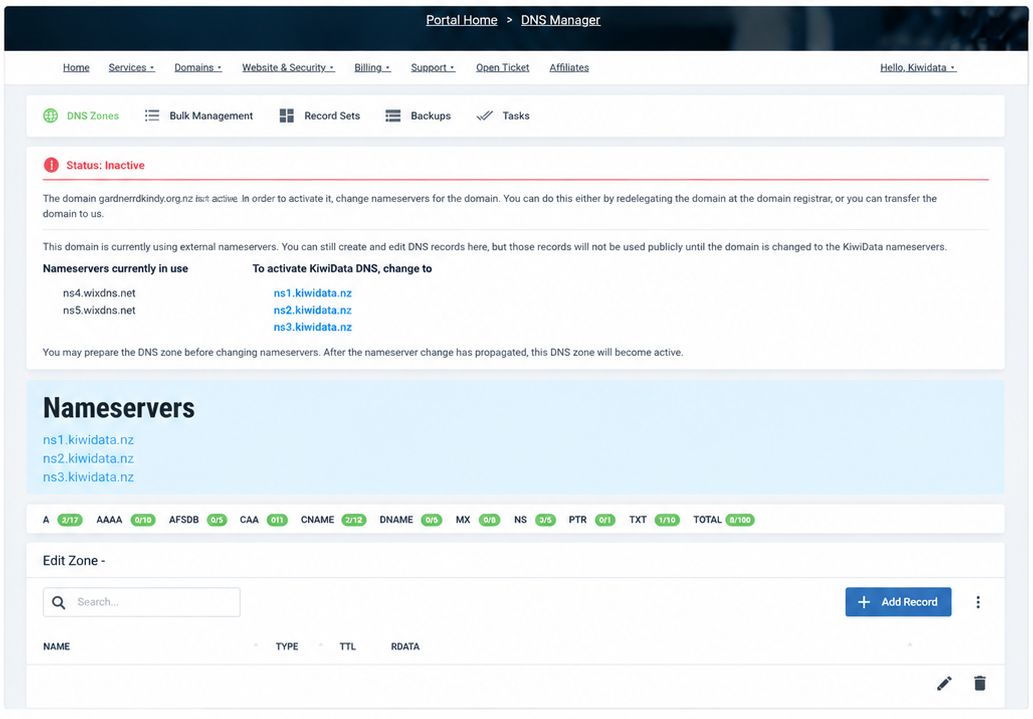
What does this mean?
- Your domain is using external nameservers (for example, another hosting provider, website builder, or registrar).
- You can still create and edit DNS records in KiwiData DNS Manager.
- These records will not be used on the internet until you change your domain's nameservers to KiwiData.
What do I need to do?
- Log in to your domain registrar (the company where your domain is currently registered).
- Make sure all the DNS records you require have been created in KiwiData DNS Manager.
- Change your domain's nameservers to:
ns1.kiwidata.nz
ns2.kiwidata.nz
ns3.kiwidata.nz- Save the changes.
- Wait for the nameserver change to propagate. This can take anywhere from a few minutes to 48 hours.
- Once your domain is using the KiwiData nameservers, the status in DNS Manager will change to Active and your KiwiData DNS records will become live.
Good to know
You can set up all your DNS records in KiwiData DNS Manager before changing your nameservers. This is recommended because it allows you to check that your website, email and other services have the correct DNS records before making the change.
As soon as your domain is pointing to ns1.kiwidata.nz, ns2.kiwidata.nz and ns3.kiwidata.nz, your KiwiData DNS zone will become active automatically.

