
DNSSEC (Domain Name System Security Extensions) adds an additional layer of security to your domain's DNS. It helps protect visitors from being redirected to fraudulent destinations by allowing DNS responses to be cryptographically verified.
If your domain is registered with KiwiData, you can manage the DNSSEC information that is submitted to the .nz registry from your KiwiData Client Area.
Before enabling DNSSEC, it is important to know where your DNS is hosted.
Scenario 1 — Your DNS is hosted by another provider
Use these instructions if your domain is registered with KiwiData but the DNS is hosted by another provider, such as another web hosting company, cPanel provider, Cloudflare, or another DNS service.
Step 1 — Enable DNSSEC with your DNS provider
Log in to the control panel of the company that hosts your DNS and enable DNSSEC for the domain.
For example, with cPanel this is normally located under:
cPanel → Zone Editor → DNSSEC
Your DNS provider will generate the DNSSEC keys and provide a DS record.
You will normally be given the following information:
- Key Tag — for example
8635 - Algorithm — for example
8 - Digest Type — for example
2 - Digest — a long hexadecimal value
Do not create or change these values yourself. Use the exact DS record supplied by your DNS provider.
Step 2 — Add the DS record at KiwiData
Log in to your KiwiData Client Area and go to:
Domains → My Domains → select your domain → DNSSEC
Enter the DS information supplied by your DNS provider into the corresponding fields:
Key Tag → Algorithm → Digest Type → Digest
Then select Update DS Records.
KiwiData will submit the DS record to the .nz registry.
Once the DNSSEC information has propagated, validating DNS resolvers will be able to verify the DNSSEC chain for your domain.
Important
Your DNS provider must continue signing the DNS zone while the DS record is published at the registry.
Do not disable DNSSEC or delete the DNSSEC keys at your DNS provider while the DS record is still active at KiwiData.
Doing so can cause your domain to fail DNSSEC validation, which may make your website and email appear unavailable to some users.
If you want to disable DNSSEC, remove the DS record from KiwiData first, allow the change to propagate, and then disable DNSSEC at your DNS provider.
Scenario 2 — Your DNS is hosted by KiwiData
Your website does not have to be hosted by KiwiData for this scenario.
For example, your website could be hosted by another company while the domain uses KiwiData's DNS servers. In that situation, KiwiData is your DNS provider, so DNSSEC must be enabled on the KiwiData DNS service.
Do not generate DNSSEC keys at your website hosting provider if they are not providing the authoritative DNS for your domain.
How to enable DNSSEC
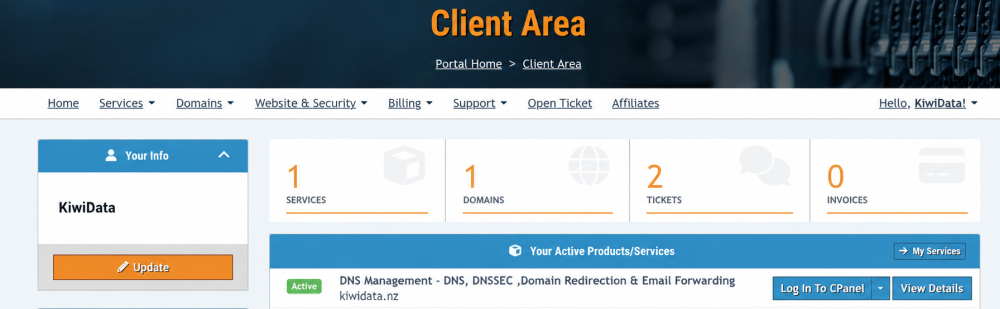
If your domain uses KiwiData DNS and you have access to the associated cPanel account, go to:
cPanel → Zone Editor → DNSSEC
Enable DNSSEC for the domain.
cPanel will generate the required DNSSEC signing keys and display the DS record.
The DS information will contain:
Key Tag → Algorithm → Digest Type → Digest
Next, log in to your KiwiData Client Area and go to:
Domains → My Domains → select your domain → DNSSEC
Enter the DS information generated by the KiwiData cPanel server and select:
Update DS Records
KiwiData will then submit the DS record to the .nz registry.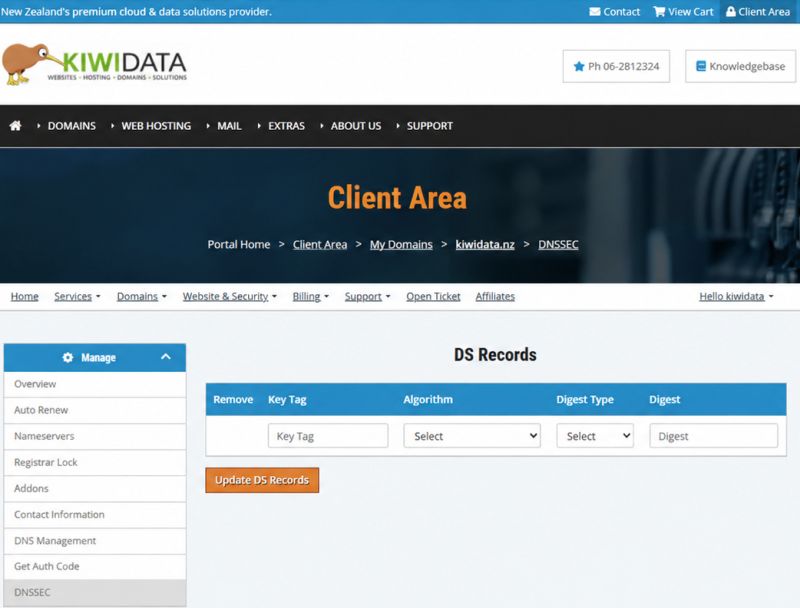
Under Overview Check DNSSEC is active or Not

How do I know who hosts my DNS?
The important thing is where your domain's authoritative DNS zone is hosted, not necessarily where your website or email is hosted.
For example:
Domain registered with KiwiData + website hosted elsewhere + DNS hosted by KiwiData
→ Enable DNSSEC on the KiwiData DNS service.
Domain registered with KiwiData + DNS hosted by another company
→ Enable DNSSEC at the other DNS provider, then copy their DS record into the KiwiData Client Area.
Domain registered with KiwiData + Cloudflare DNS
→ Enable DNSSEC at Cloudflare, obtain the DS record from Cloudflare, and enter it into the KiwiData Client Area.
Never enable DNSSEC in the wrong place
DNSSEC signing must be enabled at the provider that operates the authoritative DNS servers for your domain.
If you are unsure who hosts your DNS, contact KiwiData before enabling DNSSEC. We can help you identify the correct DNS provider and avoid creating an invalid DNSSEC configuration.
Need help?
DNSSEC is designed to improve the security of your domain, but incorrect DNSSEC settings can prevent your website, email and other domain services from resolving correctly.
If you're unsure about any of the settings, please contact KiwiData Support before making changes.

