
KiwiData Name Server Details
| Name Server | IP Address |
|---|---|
| ns1.kiwidata.nz | 163.47.130.147 |
| ns2.kiwidata.nz | 172.105.163.183 |
| ns3.kiwidata.nz | 103.51.100.7 |
Managing Your DNS Zone
If you have purchased only a domain name and require DNS Zone Management, you can manage your DNS records through the KiwiData Client Area.
To Manage DNS Records
- Log in to the KiwiData Client Area
- Go to Domains
- Select Manage DNS
Default Name Server Setup
By default, all domains registered with KiwiData will use the KiwiData name servers listed above.
If you would like to use third-party services such as:
- Wix
- Shopify
- Squarespace
- Microsoft 365
- Google Workspace
- Cloudflare
- Other hosting providers
you may change your name servers to theirs instead.
Important Notice Before Changing Name Servers
Changing your name servers incorrectly can interrupt:
- Email services
- Website hosting
- DNS records
- SSL certificates
- Other connected services
If you currently have hosting, email, or any other services with KiwiData and decide to use external name servers, you will need to manually recreate the required DNS records at the new DNS provider.
This includes records such as:
- MX Records (Email)
- A Records
- CNAME Records
- TXT/SPF/DKIM Records
- Autodiscover Records
Failure to add these records correctly may result in email or website outages.
Hosting and Email Services
If you purchase hosting or email services from KiwiData and use the KiwiData name servers, your DNS records will normally be configured automatically for you.
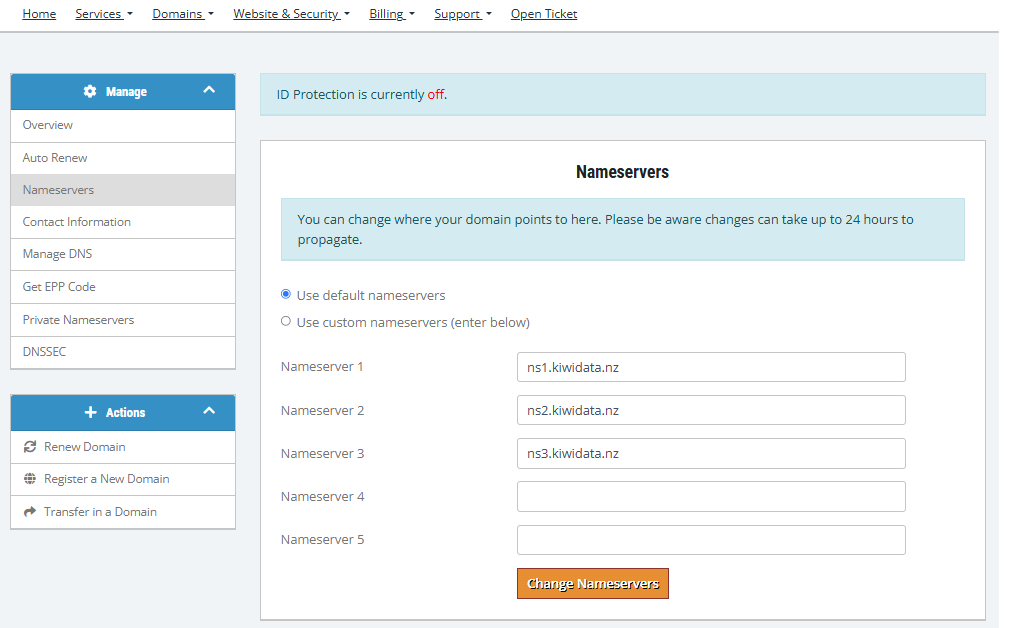
How To Change Your Name Servers
- Log in to the KiwiData Client Area
- Go to Domains
- Click My Domains
- Click the green Active status beside your domain
- Select Nameservers from the left menu
- Choose Custom Nameservers
- Enter the required name servers
- Save changes
how to check if you site has updated dns around the world https://www.whatsmydns.net

